 Chandler
Quoting
from the vessel's inquiry to an approved quote
Turn a vessel's inquiry into an approved quote within two hours. AI reads the list, suppliers price online, your margin is applied automatically and management approves before it goes out.
Used by: Purchasing officer · Management
In short: Chandler's Quoting module reads a vessel's inquiry from email, PDF, Excel or a photo, matches each line to your catalogue, collects supplier prices through a link, applies your margin formulas and sends the approved quote to the agent. The goal is a priced, approved quote in under two hours.
The inquiry cover: everything about the call, on one screen
Every order starts with an inquiry. Chandler captures the vessel's details once, and they follow the order to the final invoice.
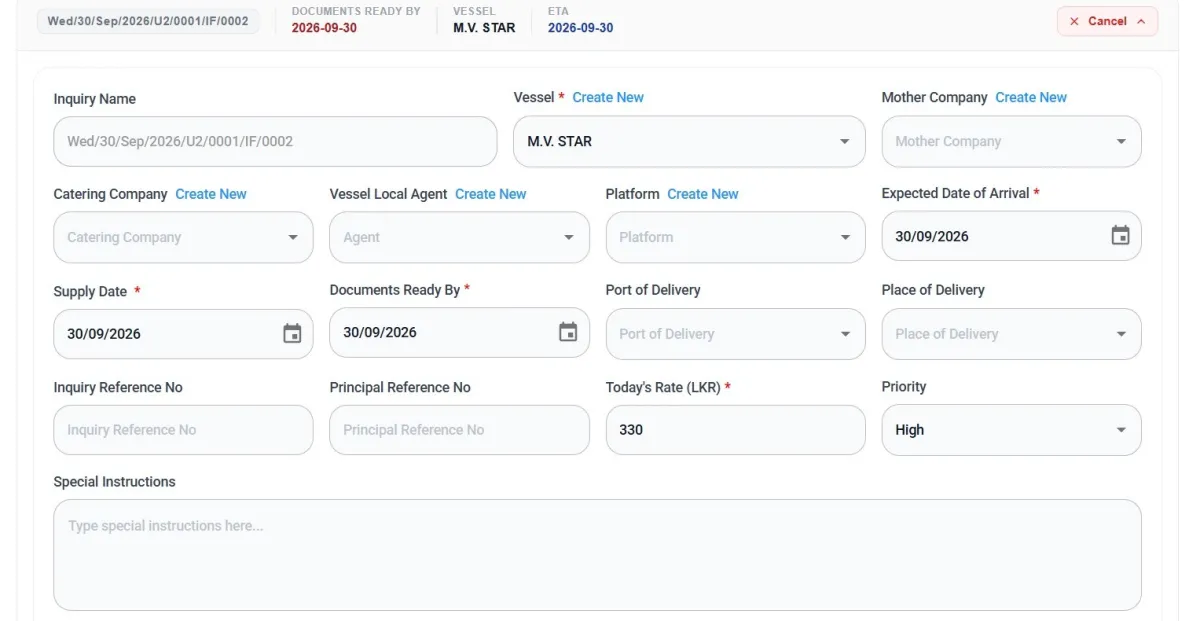
- Automatic inquiry reference for every inquiry, so nothing is filed under the wrong name
- Vessel, mother company, catering company, local agent and platform, each with "Create new" right on the form
- Arrival, supply and documents-ready-by dates shown in the header, so deadlines are always visible
- Port and place of delivery, plus inquiry and principal reference numbers to match the customer's paperwork
- Today's exchange rate locked to the inquiry, so the quote is priced on the right rate
- Priority to sort what gets worked on first, and special instructions carried through the whole order
Upload the list. AI fills in the rest.
AI turns the vessel's requisition into a checked item list, matched to your own catalogue.
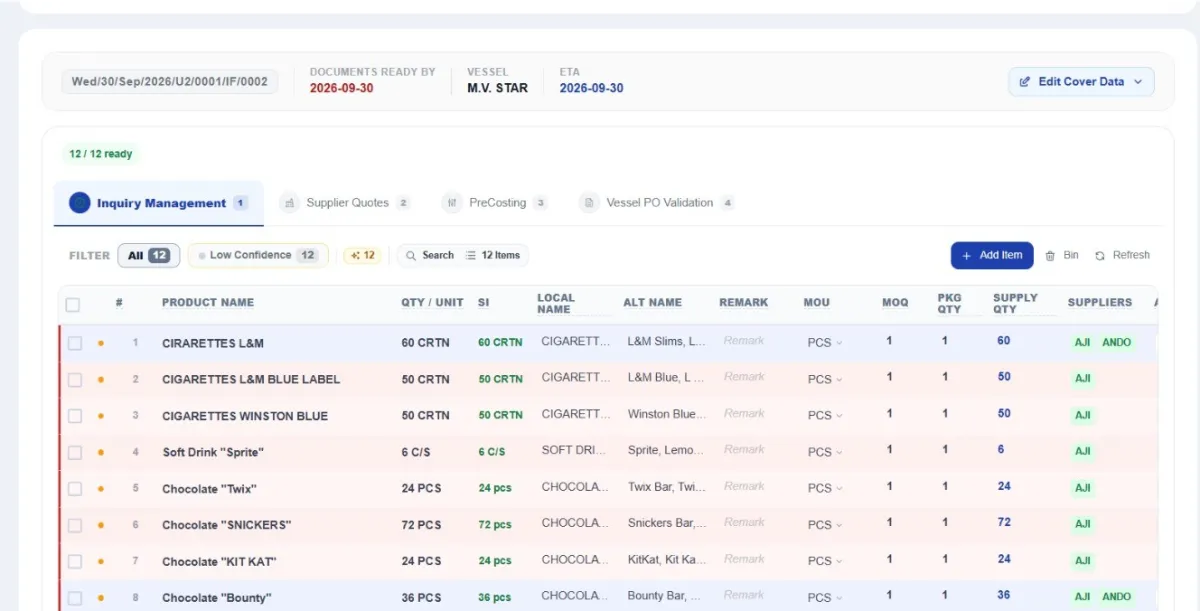
- Reads Excel, PDF, email text and photos of a requisition, including IMPA codes
- Matches each line to your own catalogue and past orders, with local and alternative names
- Suggests suppliers for each item, based on who has supplied it before
- Flags low-confidence lines so a person checks them before anything goes out
- Every line in detail: quantity and unit, ship's unit, minimum order, pack and supply quantity, remarks
- No data to load first: add items by name as inquiries arrive and your catalogue grows with every order
BenefitNo retyping and no missed lines. An inquiry that took hours to key in becomes a checked work file in minutes.
Suppliers enter their own prices
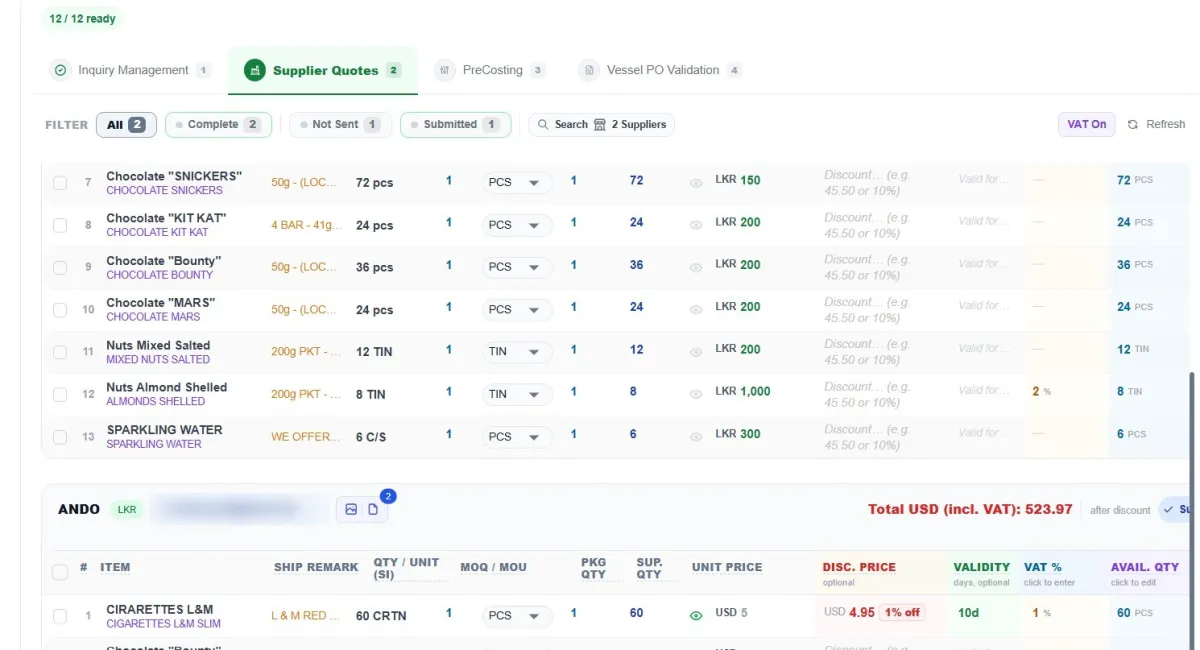
Instead of emailing spreadsheets and chasing by phone, each supplier gets a secure link to price your items.
- A link, not a spreadsheet: opens on the supplier's phone or computer, with no app or login
- Instant confirmation for the supplier once they submit
- Status at a glance: complete, not sent and submitted
- Unit price in the supplier's currency, converted for you
- Discounts, validity in days, VAT % and available quantity per line
- Remarks both ways, such as "alternative brand available", plus attachments per supplier
- Compare suppliers side by side, item by item
- Past prices and supplier performance tracked for every item
BenefitNo more chasing. Your team stops ringing round and copying prices into Excel, and every price is kept for next time.
Quote the ship with your margin built in
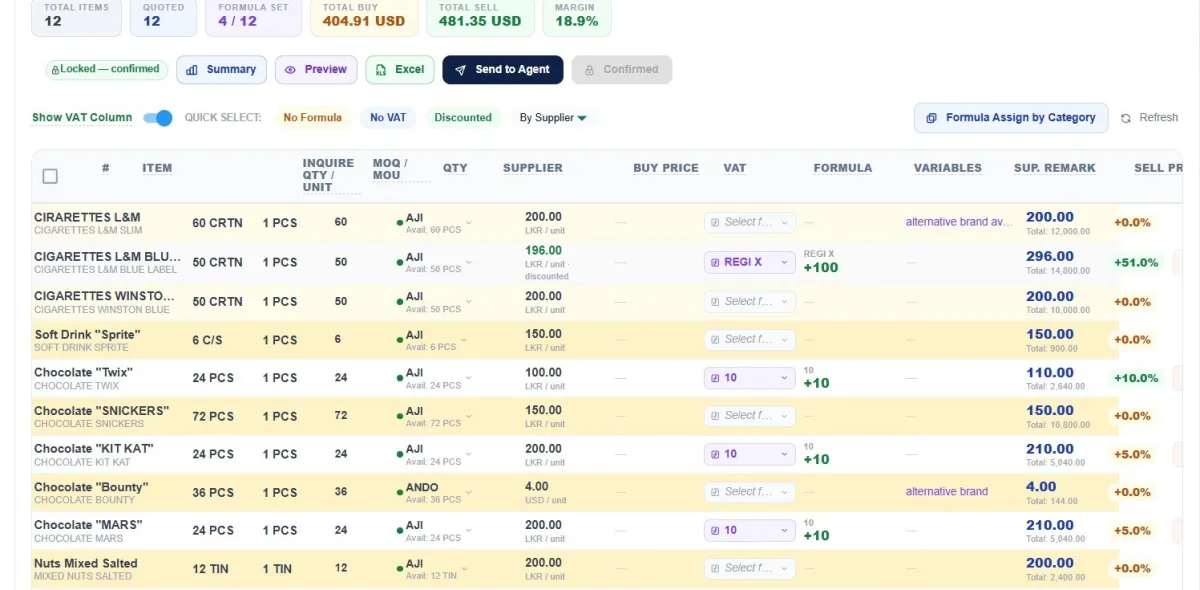
Chandler picks the supplier price, applies your margin formula and shows the result before anything is sent.
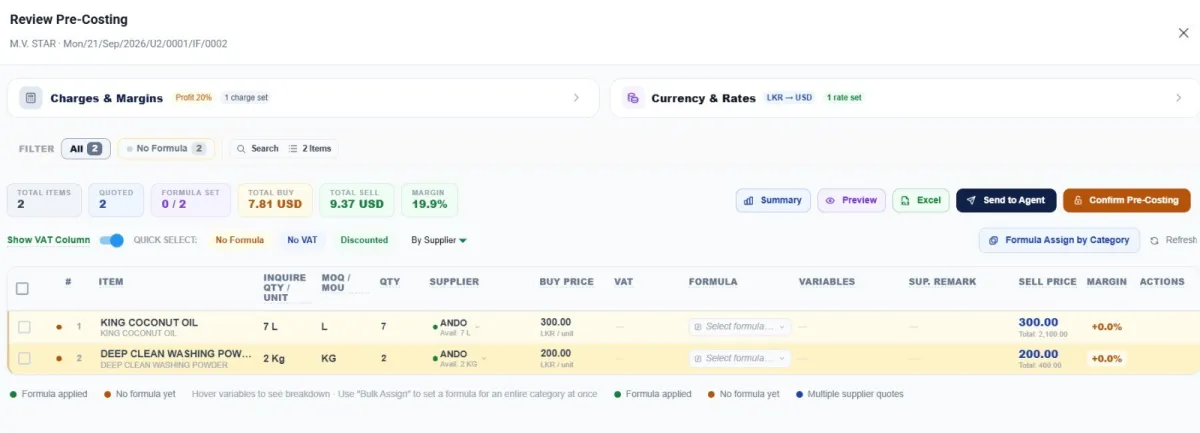
- Live totals: items, items quoted, formulas set, total buy, total sell and margin %
- Margin formulas per item, or for a whole category at once
- Choose the supplier per line, with each supplier's available quantity shown
- Buy price in the supplier's currency, sell price in the customer's currency
- Margin per line, colour-coded, so a loss-making line stands out
- Quick select: lines with no formula, no VAT, discounted, or by supplier
- Summary, preview and Excel export of the quote
- Send to agent in one click; the quote locks once confirmed
BenefitYour quotation is ready within two hours, priced accurately every time, using past prices and supplier performance.
Approve every quote before it goes out
No quote reaches an agent below your target margin. Management sees every pending quote in one queue.
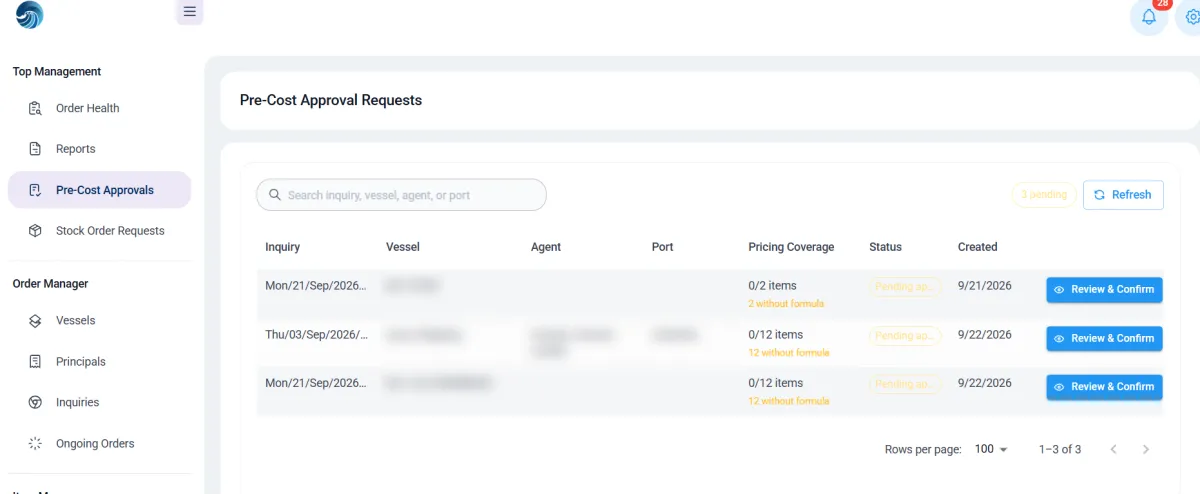
- Approval queue with search by inquiry, vessel, agent or port
- Pricing coverage per quote: lines priced and lines with no formula
- Charges and margins: profit % and extra charge sets, such as transport or launch hire
- Currency and rates: the conversion used is shown and set here
- Review, confirm, then send to the agent
- Stock order requests also come to management for approval
Quoting:common questions
Last updated 6 October 2026
How does Chandler read a ship's inquiry?
Upload the inquiry as an Excel sheet, a PDF, email text or a photo of the requisition. The AI reads every line, including IMPA codes, matches it to your catalogue and past orders, and flags lines it isn't sure about for a person to check.
Do suppliers need to install anything to send prices?
No. Each supplier gets a secure link that opens on a phone or computer, with no app or login. They enter prices, discounts, validity, VAT and available quantity, and get instant confirmation.
Can we set different margins for different items?
Yes. Set a margin formula per item, or for a whole category at once. Every quote shows total buy, total sell and margin, and loss-making lines are colour-coded.
Five modules, one system
See Chandleron your own inquiry.
Send us a real inquiry and we'll show you, in 30 minutes, how Chandler reads it, prices it and turns it into a quote.
- Your workflowsTell us which workflows you want to automate.
- A real inquirySend us a quote request you received from a ship.
- Your demoWe prepare it and walk your team through it.